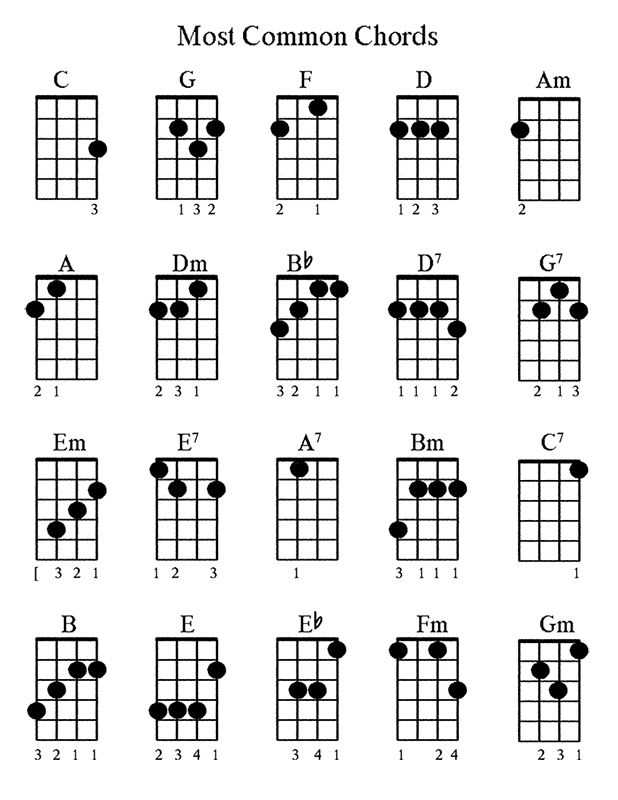
Choose a one-page PDF with the 12 most used harmonies (C, G, D, A, E, F and their minor variants) arranged in a 4×3 grid; this layout fits A4 and US Letter without scaling and keeps each fingering box at least 3×3 cm for clear visibility on a music stand. Prioritize versions that show string numbers (1–4), fret markers up to the 7th fret, and solid dots for finger placement rather than hollow circles, which are harder to read from 1–2 meters away.
Select sheets that include both open-position shapes and movable barre forms with the root note highlighted. A practical set contains at least 36 diagrams: major, minor, dominant 7th, and minor 7th for the most common keys. For beginners, look for simplified layouts limited to the first five frets and color-coded finger numbers (1–4). For intermediate players, add diminished and suspended forms, plus a compact circle-of-fifths reference placed in the margin no wider than 2 cm.
Check paper settings before saving: 300 DPI resolution prevents blurred fret lines, and black-only vector graphics reduce ink usage by up to 40% compared to grayscale shading. Leave 10–12 mm margins to allow hole punching without cutting off string labels. If you rehearse in low light, opt for thicker 1.5 pt fret lines and 14–16 pt sans-serif labels for chord names above each grid.
Keep separate versions for standard G–C–E–A tuning and low-G tuning, clearly marked at the top of the page. Store the file in both A4 and Letter formats to avoid automatic scaling that shrinks diagrams below readable size. A well-designed fingering reference sheet shortens practice setup time and keeps frequently used harmonic shapes within immediate reach.
Ukulele Chord Chart Free Printable for Practice, Tuning, and Song Learning
Download a one-page fingering reference in A4 or US Letter size that displays major, minor, dominant seventh, and minor seventh shapes in standard G–C–E–A tuning; place it on a music stand at eye level and keep all four open-position forms within a single glance to reduce hesitation during drills.
For daily practice, select a layout that groups triads by key rather than alphabetically; this allows focused repetition such as C–F–G–Am progressions across 60–80 bpm with a metronome, increasing speed by 5 bpm only after two clean cycles without muted strings or buzzing frets.
During tuning checks, use a diagram that labels string numbers (4–1) and fret positions clearly; compare finger placement against the guide while sounding each open string against a clip-on tuner set to 440 Hz, then verify intonation by fretting at the 12th fret and confirming the octave reads within ±5 cents.
For song learning, choose a sheet that includes barre shapes up to the 7th fret; many pop arrangements rely on movable forms such as E and B, and having their fretboard maps visible shortens the time needed to shift between positions without breaking rhythm.
Opt for high-contrast black lines on white background with fret markers at 3rd, 5th, and 7th positions; thin grey grids become hard to read under warm indoor lighting below 300 lux, while bold 0.7–1 pt lines remain legible from 1–1.5 meters.
Beginners benefit from versions that display finger numbers (1–4) inside each dot; advanced players can switch to minimalist diagrams without numbers to train muscle memory and reduce visual dependency after roughly 4–6 weeks of consistent 15-minute sessions.
Laminate the page or place it in a transparent sleeve; this prevents edge wear and allows marking temporary annotations such as capo position or transposed keys with a dry-erase marker during rehearsals.
For structured repertoire building, print separate sheets by key–C, G, D, A–and pair each with three songs sharing the same harmonic set; rotating keys weekly builds familiarity with at least 20–25 common shapes over two months while maintaining steady tempo control.
How to Choose a Ukulele Chord Chart Free Printable by Tuning Type (Standard GCEA vs Low G) and Skill Level
Select a fingering sheet that matches your tuning before anything else: if your instrument uses re-entrant GCEA (high G), choose diagrams that reflect the high fourth string; if you use linear tuning with a low fourth string, pick layouts labeled “Low G” or “linear G.” In high G setups, shapes like C6 (0000) and Am7 (0000) produce a brighter top string, while in low G the same fingerings yield a deeper bass response that affects voicing clarity in progressions such as C–G–Am–F. Verify that the grid indicates string order from left to right as G–C–E–A and that any bass-note markings (e.g., slash chords like C/G) align with your fourth string pitch; otherwise, you may misinterpret inversions and bass movement.
For beginners, use a one-page fingering diagram limited to 12–16 open-position shapes with large fret grids (at least 2.5–3 cm high) and clear dot markers; prioritize C, G, F, Am, Dm, Em, A7, and E7 in GCEA tuning, adding G7 and D7 for common cadences. Intermediate players should look for extended harmonies (maj7, m7, 6, sus2, sus4) and movable barre forms with fret numbers up to the 7th position; ensure the sheet shows finger numbers (1–4) to reduce hand strain during transitions like F–G–Em–Am. Advanced players benefit from multi-position layouts that display three voicings per harmony across the neck (open, mid-neck around 5th–7th frets, and higher inversions), plus notation of root location to control bass lines–particularly relevant for Low G setups where the fourth string can carry melodic movement.
Check formatting details before downloading: confirm page size (A4 or US Letter), margin width under 12 mm to maximize grid area, and vector-based graphics for sharp printing at 300–600 dpi. Prefer black-and-white layouts with high-contrast fret lines (at least 0.75 pt stroke) to avoid ink bleed. If you switch between re-entrant and linear tuning, keep two separate fingering references labeled clearly to prevent mixing voicings during rehearsal or performance.