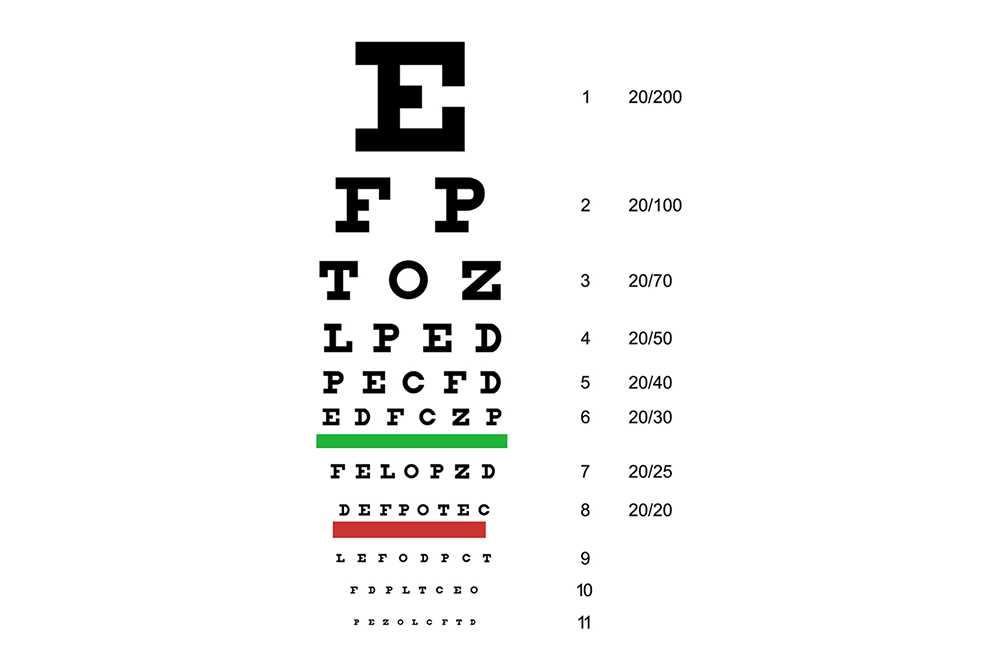
To check your vision at home, start by downloading a structured visual acuity sheet. Ensure it is printed at the correct scale for accurate measurements. Use thick paper or card to avoid distortion during use.
Once printed, place the sheet on a flat surface or wall, standing approximately 10 feet away. Ensure the room is well-lit for clear visibility. It’s important to cover one eye at a time during the test to evaluate each eye separately.
After completing the test, review your results to assess how well you can read the lines from top to bottom. If you notice any difficulty, it’s recommended to schedule a professional exam for a more precise evaluation.
How to Use a Vision Test Sheet at Home
Start by ensuring that the visual acuity sheet is printed at the correct size. The standard test is based on a distance of 20 feet, so make sure the sheet is printed without scaling or resizing. If printed incorrectly, the results may not be accurate.
Place the printed sheet on a flat surface or wall, ensuring it’s at eye level. Stand exactly 10 feet away from the sheet. The room should be brightly lit, and the light should not shine directly on the sheet to avoid glare.
Cover one eye at a time and begin reading the top line of letters. Each subsequent line contains smaller text. Start with the largest letters and proceed downwards. If you can’t read a line, move to the next larger line or stop there. Record the smallest line you can read comfortably.
Test each eye separately and compare the results. If you experience difficulty reading lines, it could indicate that corrective lenses are needed. This method can help you detect vision issues but is not a substitute for a professional exam.
If you struggle with any of the lines, consider scheduling an appointment with an optometrist to further evaluate your eyesight. Regular testing can help track changes and keep your vision health in check.
How to Print a Vision Test Sheet at Home
First, download the correct visual acuity sheet from a reliable source. Make sure the file is in PDF format to maintain the proper dimensions when printing. Double-check that the sheet is designed for a 20-foot test distance for accurate results.
Before printing, adjust your printer settings. Set the paper size to standard letter size (8.5 x 11 inches) and choose the “Actual Size” or “100%” option in the print menu. This will ensure that the design prints without any scaling or resizing, which could affect the test’s accuracy.
Use thick paper, like cardstock, to prevent the sheet from tearing or bending during use. This will help maintain the integrity of the test while you’re measuring your vision. Avoid using flimsy paper, as it might distort the layout of the design and make it difficult to read clearly.
Once printed, carefully check the dimensions of the sheet. It should match the standard size and fit your setup for the test. If the printed sheet appears too small or too large, adjust your print settings and try again.
Next, place the sheet on a flat surface or wall, ensuring it’s positioned at eye level. A well-lit area is ideal, as poor lighting can cause glare or shadows, affecting the clarity of the text. For best results, stand 10 feet away from the sheet during the test.
After printing, follow the instructions to test your vision. If you’re unsure about the setup, check that the sheet is positioned correctly and there is no distortion in the printed letters. This simple setup can provide a quick check of your vision before seeking professional help if needed.