Choose a sturdy 250–300 gsm sheet and a clean 4×6 inch layout to get sharp, durable message pieces that handle frequent use. Thicker stock prevents ink bleed and keeps edges firm after trimming, while a standard size fits most envelopes without adjustment.
Well-planned mini message sheets help structure reminders, study prompts, and quick correspondence without clutter. Use a margin of at least 0.25 inches on all sides and keep text blocks under 70% of the surface area. Light background tones with dark text improve readability under both daylight and warm indoor lighting, which reduces eye strain during repeated reference.
Printable Note Cards: Practical Guide for Design and Use
Use a 300 dpi canvas and limit your palette to three colors to maintain sharp output and visual clarity. Keep headings at 14–18 pt and body text at 10–12 pt so small-format message sheets remain readable after trimming.
Align content to a simple grid and leave at least 6 mm inner padding to prevent text from crowding the edges. Rounded corner cuts of 3–5 mm reduce wear in wallets and planners. For repeated use, choose matte coating; it accepts pen ink without smudging, unlike glossy finishes that resist handwriting.
How to Choose the Right Paper Size and Card Dimensions for Printable Note Cards
Select 4×6 inches for general reminders and quick reference pieces. This format balances writing space and portability.
Pick 3×5 inches for flash-style study aids. Smaller formats suit dense information reviewed frequently.
Use A7 (5×7 inches) when the content includes diagrams or longer messages. Larger surfaces prevent crowding and improve scanning speed.
- 4×6 in – daily reminders and short messages
- 3×5 in – memorization prompts
- 5×7 in – detailed layouts or graphics
Match sheet size to your printer tray. Standard home devices handle US Letter (8.5×11 in) and A4 best, allowing multiple pieces per page.
- Place two 4×6 layouts on one Letter sheet in landscape.
- Fit four 3×5 layouts on A4 with 0.25 in spacing.
- Keep cut marks at 0.5 pt stroke for clean trimming.
Check grain direction on heavier stock. Folding against the grain causes cracking along the edge.
Test one sample before bulk printing. Verify margins, color density, and trimming accuracy to avoid material waste.
How to Pick Age-Appropriate Letter Puzzle Difficulty
Best Page Layouts for Classroom and Home Use
Ways to Turn Holiday Letter Hunts Into Learning Activities
Use a 12×12 letter grid for younger children and increase to 15×15 for older students to keep the activity challenging without causing frustration. Limit hidden terms to 8–12 items for early readers and up to 20 for advanced groups.
Clear typography improves puzzle usability. Choose sans-serif fonts at 18–22 pt for grids and keep spacing between letters at least 2 mm. High contrast ink on white paper helps children track lines without losing their place.
Smart Ways to Create High-Quality Print-at-Home Message Sheets
Use vector-based layouts instead of raster images to keep lines crisp after printing. Vector grids remain sharp at any scale.
Set printer output to 300 dpi or higher. Lower settings often produce fuzzy letter edges that slow down scanning.
Keep line weight between 0.75 and 1 pt. Thinner lines fade; thicker ones crowd the grid.
Limit each sheet to one puzzle per page. Crowded layouts reduce readability and complicate cutting.
Choose uncoated paper around 90–120 gsm. This weight feeds smoothly through most home printers and accepts pencil marks without smearing.
Add a clearly separated answer key on a second page rather than overlaying highlights on the main puzzle. This keeps the activity reusable.
Test grayscale printing if color ink is limited. Proper contrast ensures the puzzle remains clear without colored elements.
Store finished sheets in a dry folder to prevent curling before classroom or home use.
Choosing the Best Page Layout for Group Singing
Font Size and Spacing Tips for Readable Song Sheets
Home Printer Settings That Keep Holiday Song Pages Sharp
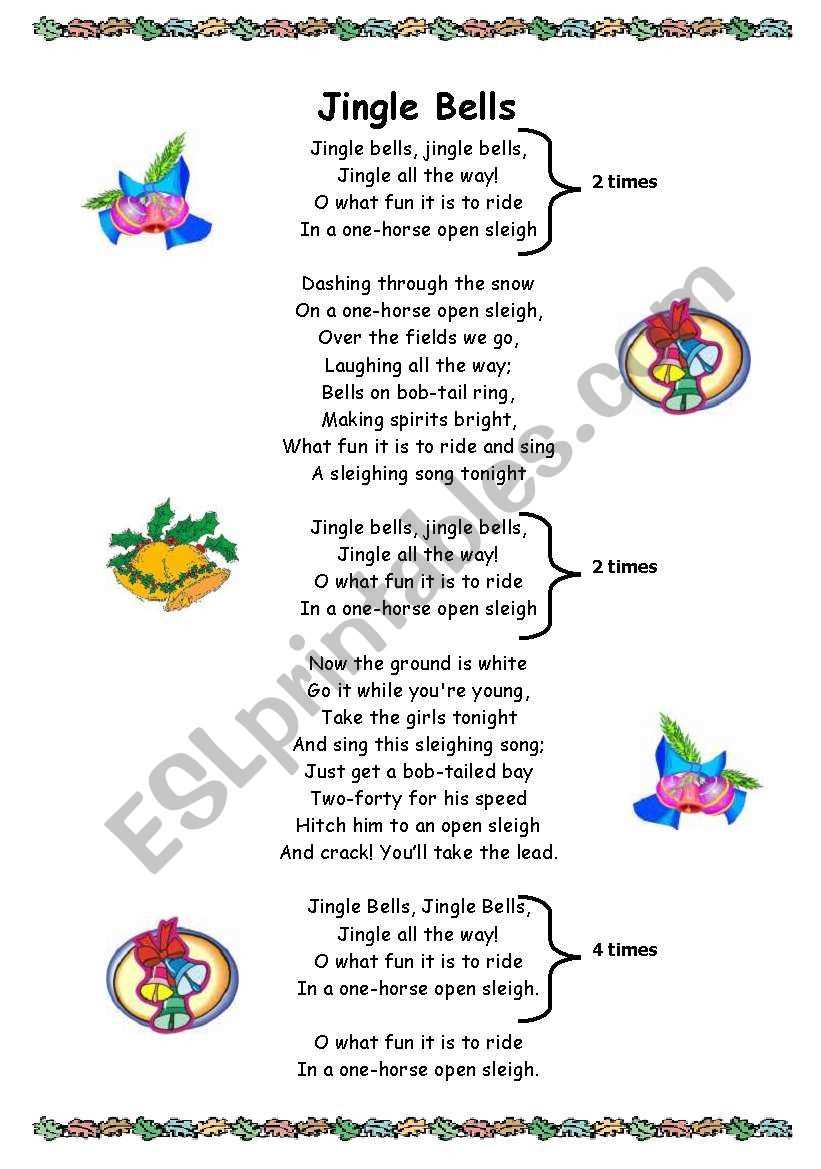
Use a 12–14 pt serif font and keep line spacing at 1.3 to maintain readability during group singing. Place the chorus in bold to help readers track repeated lines without hesitation.
One-page formatting works best for classroom distribution. Keep margins at 0.5 inches and avoid decorative backgrounds that reduce contrast. Black text on plain white paper produces the cleanest result on most home printers and keeps ink usage low.
Select 200–230 gsm matte stock before creating your first batch of small message sheets; this thickness prevents ink bleed and keeps edges firm after trimming. Keep the working size at 4×6 inches for balanced writing space while still fitting four pieces on a standard A4 page. Set margins to at least 0.25 inches to avoid edge clipping on home printers.
Compact paper prompts perform best with minimal decoration and strong contrast. Use dark gray or black text at 10–12 pt for body areas and reserve color accents for headers only. Clean layout discipline improves readability: dedicate roughly 70% of the surface to handwriting space and limit background graphics to the corners so pens and markers glide without interference.
Printable Note Cards Practical Guide for Design and Use
Use a fixed canvas of 3×5 or 4×6 inches and lock proportions before placing any text elements; resizing later often distorts spacing. Keep header zones under 15% of total height and maintain at least 0.3 inches of inner padding on all sides so trimming errors do not cut into content. Choose one serif font for headings and one sans-serif for body text, both embedded in the export file.
Paper weight between 180 and 230 gsm provides the best balance between printer compatibility and durability during handling. Align multiple pieces on a single A4 sheet using a two-column grid with 0.125-inch bleed spacing, then test one page before batch production to verify edge accuracy and ink density.
How to Choose the Right Paper Size and Card Dimensions for Printable Note Cards
Pick 4×6 inches for general reminder slips; this size fits four units on A4 with narrow margins and leaves enough room for 6–8 handwritten lines.
Match the layout to your base sheet format to reduce waste and trimming time.
- A4: fits four 4×6 pieces with 0.25-inch outer margins.
- Letter: fits two 5×7 pieces with safer cutting space.
- Half-letter: works well for folded mini message sheets.
Adjust orientation before placing guides. Landscape arrangements usually allow tighter nesting and cleaner cuts on home trimmers.
Choose dimensions based on use case rather than aesthetics alone.
- 3×5 inches – quick reminders and flash prompts.
- 4×6 inches – short written messages and study aids.
- 5×7 inches – longer personal notes or inserts.
Paper thickness changes handling feel and printer behavior. Test with your device before committing to large batches.
- 160–180 gsm – classroom volume printing.
- 200–230 gsm – everyday desk use.
- Above 250 gsm – only for printers rated for heavy stock.
Keep a 0.125-inch bleed and at least 0.3-inch safe zone inside the trim line; this prevents text loss during cutting.
Store finished pieces in boxes at least 2–3 mm larger than the final size so corners remain sharp during long-term storage.
How to Set Grid Size for Different Age Groups in February Puzzles
Best Layout Settings for Clean Home Printed Letter Hunts
Paper and Ink Choices That Keep Puzzle Sheets Sharp
Set puzzle grids between 12×12 and 15×15 for children under ten; larger matrices increase frustration and slow completion time. Use bold uppercase characters at 14 pt and keep cell spacing near 0.4 inches so circles or highlights remain visible after home output. Place the term list in two columns beneath the grid to prevent eye strain.
Seasonal letter puzzles work best on bright white paper with minimal background graphics. Consistent line weight of 1–1.25 pt keeps grid borders sharp on standard inkjet devices. Export files at 300 DPI and leave a 0.5-inch outer margin so most home printers handle alignment without clipping.
Smart Ways to Create High-Quality Print-at-Home Message Sheets
Set document resolution to 300 DPI before exporting any puzzle page.
Choose black or dark gray for grid lines and character sets; heavy color blocks increase ink spread on home devices.
Keep outer margins at 0.5 inches so common printers feed paper without edge loss.
Use vector-based fonts rather than raster text so letters remain sharp after scaling.
Limit decorative graphics to the top corners; busy backgrounds reduce puzzle readability.
Test both draft and high-quality modes and compare line clarity under normal room lighting.
Arrange multiple puzzle sheets per page using a two-column layout to save paper during classroom runs.
Store final PDFs with embedded fonts to prevent substitution problems on other computers.
Best Font Size and Spacing for Holiday Song Handouts
How to Format Verses and Chorus for Easy Group Reading
Paper Choices That Keep Song Sheets Easy to Handle
Use a minimum type size of 14 pt for carol handouts so participants can read from arm’s length without squinting. Keep line spacing between 1.3 and 1.5 and print on bright white paper rated at 90–120 gsm for smooth feeding through home printers. Leave a 0.5-inch margin on all sides to avoid clipping.
Well-structured sing-along pages reduce confusion during rehearsals. Bold verse labels and consistent chorus placement help groups follow the flow without repeated instructions. Export the file as PDF with embedded fonts so spacing remains stable across devices.
Printable Note Cards for Everyday Organization and Quick Messages
Choose compact memo slips sized 3×5 inches for fast reminders that fit planners and desk trays.
Use cardstock between 200 and 230 gsm so each piece stays firm after frequent handling.
Recommended layout structure:
- Top header strip for category tags
- Main writing zone covering about 70% of the surface
- Small footer for dates or initials
Arrange four pieces per A4 sheet using a two-by-two grid to reduce paper waste during batch printing.
Store finished stacks in labeled dividers so quick messages can be prepared without searching through loose paper.
Printable Note Cards for Everyday Organization and Quick Messages
Pick a 4×6 inch format when longer handwritten content is expected; the extra height allows 8–10 lines without crowding.
Use the following production settings for consistent results:
- Resolution: 300 DPI
- Inner padding: minimum 0.3 inches
- Bleed: 0.125 inches when trimming
- Font size for writing guides: 10–11 pt
Minimal visual noise keeps attention on the written message. Avoid full-page backgrounds and keep rule lines at 20–30% gray so pen strokes remain dominant.
Batch printing works best with small test runs. Print one sheet, trim, check edge alignment, then proceed with larger quantities.
Group finished pieces by purpose using small storage boxes; sorted stacks speed up daily planning and short written communication.