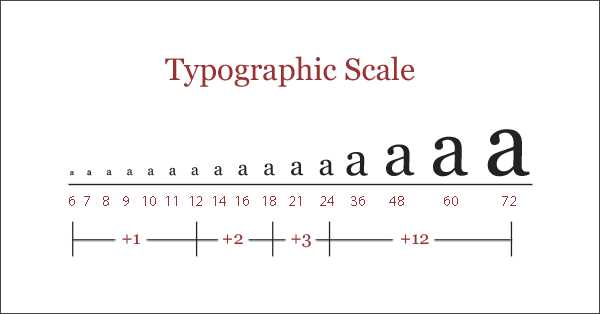
For effective design, always align the text to the specific needs of your project. A helpful guide for this is having a reference sheet that shows various text proportions clearly, helping you pick the correct one based on the context of your work.
When working with printed materials or digital designs, ensuring readability is key. For printed documents, common options are 10-12 pt for body text and 14-16 pt for headings. In web design, 16 px is the standard for body copy, with headings ranging from 24 px to 36 px, depending on their importance.
By using a consistent reference for measuring text, you’ll eliminate trial and error. Adjust your dimensions for the medium you are working on to ensure clarity, whether it’s for a website, presentation, or printed flyer. Keep in mind that varying the text size too much within a single piece can impact overall readability.
Choosing the Right Text Dimensions for Your Document
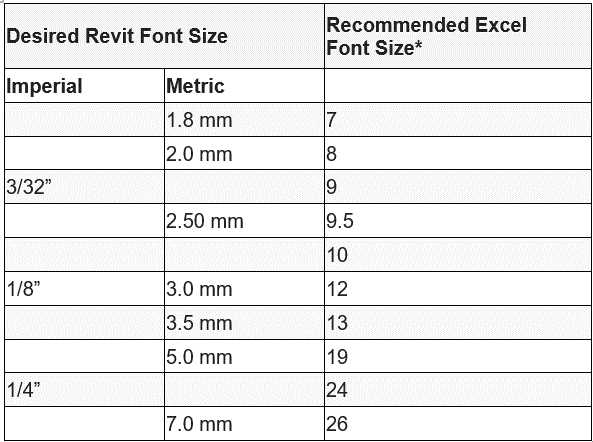
To ensure readability and consistency, always use a reference to measure text. For printed materials, standard measurements for paragraphs are typically 10-12 pt, while headers are larger, ranging from 14-18 pt. On digital platforms, the body text should usually be 16 px, and headings should vary between 24 px and 36 px, depending on the type of content.
Using a reference sheet with specific measurements can save you time and help avoid mistakes. Having a guide for both print and web formats ensures the content remains legible and aesthetically balanced, whether it’s for a professional brochure or a personal blog. Adjust the dimensions according to the medium for optimal clarity and viewer experience.
How to Use a Printable Font Size Guide for Different Projects
For documents like flyers, the text should be clear and easy to read. Refer to a size reference to choose the correct measurements for headers, body copy, and captions. Commonly, use larger dimensions for titles and smaller ones for detailed descriptions.
On websites, selecting appropriate text proportions is crucial for user experience. Body text should be 16 px for clarity, while headings can range from 24 px to 36 px. Utilize a reference for precise selection and ensure consistent design across pages.
For print materials such as brochures, ensure your measurements are set to a scale suitable for physical layouts. Typically, 10-12 pt is ideal for main text, while 14-18 pt works well for section titles. Adjust dimensions for emphasis when needed, without overcrowding the layout.
A reference sheet also helps when creating custom designs for digital projects. It provides a quick comparison of measurements to avoid guessing or mistakes. Keep it handy for immediate use, especially when working on mixed media formats like eBooks or presentation slides.